
Windows 10 Vs 11 is a common question for people who still like the older Windows feel but want a safer and newer system. Windows 10 was comfortable for many users. It was familiar, simple and stable. Microsoft, though, will stop supporting Windows 10 on October 14, 2025. This means regular security updates and support are no longer available for most users.
Windows 10 Vs 11 isn’t just about looks. It’s about security, hardware support, gaming features, and future updates. Windows 11 has a cleaner design and more strict system requirements. Also introducing newer tools for modern PCs. But Windows 10 can feel lighter and easier for older devices. So the better choice depends on your PC and daily use.
Windows 10 Vs Windows 11 Differences
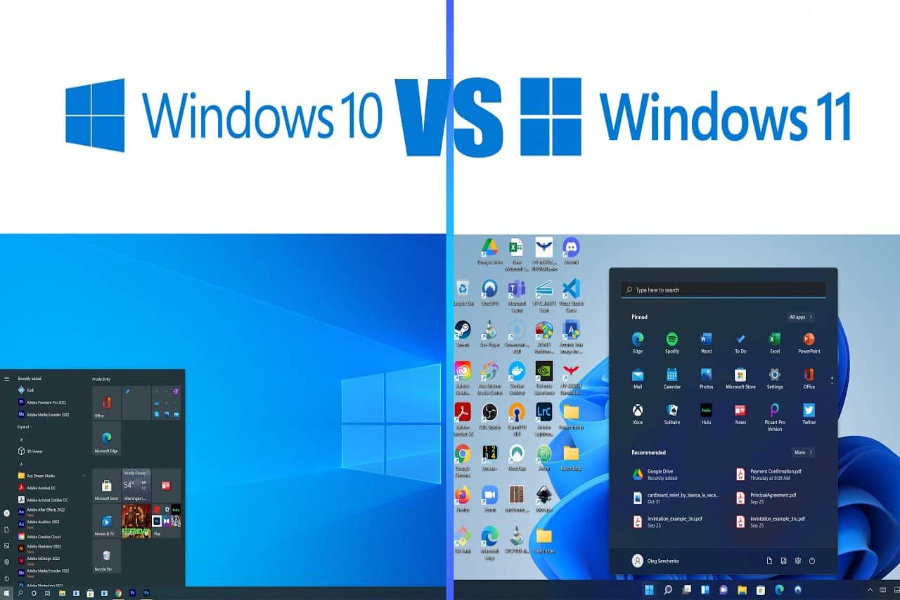
Windows 10 Vs 11 differences start with the design. Windows 11 has a centered Start menu, rounded corners, cleaner settings, and a more modern look. Windows 10 feels more traditional. Many users still like its left-side Start menu and simple layout. If you love old Windows habits, Windows 10 may feel easier at first.
The bigger difference is support. Windows 10 support ended on October 14, 2025. Microsoft says users should upgrade to Windows 11 to keep getting security and feature updates. Windows 11 also has newer requirements such as TPM 2.0, Secure Boot, compatible processor, 4GB RAM, and 64GB storage. These requirements can stop some older PCs from upgrading.
Windows 11 Vs Windows 10 Differences
Windows 10 Vs 11 also feels different in daily use. Windows 11 is made for newer devices and a cleaner workflow. It has better window snapping, better virtual desktop support, and a softer visual style. Some like this because it feels new. Others have to get used to it because menus and settings aren’t always in the same place.
Windows 11 also puts more emphasis on security . The system requirements are stricter because Microsoft wants newer hardware based protection . This can be good for long term safety . But it can be frustrating if your PC works fine on Windows 10 yet cannot officially move to Windows 11. That is one reason many users still compare both systems before upgrading.
Windows 10 Vs Windows 11 Comparison
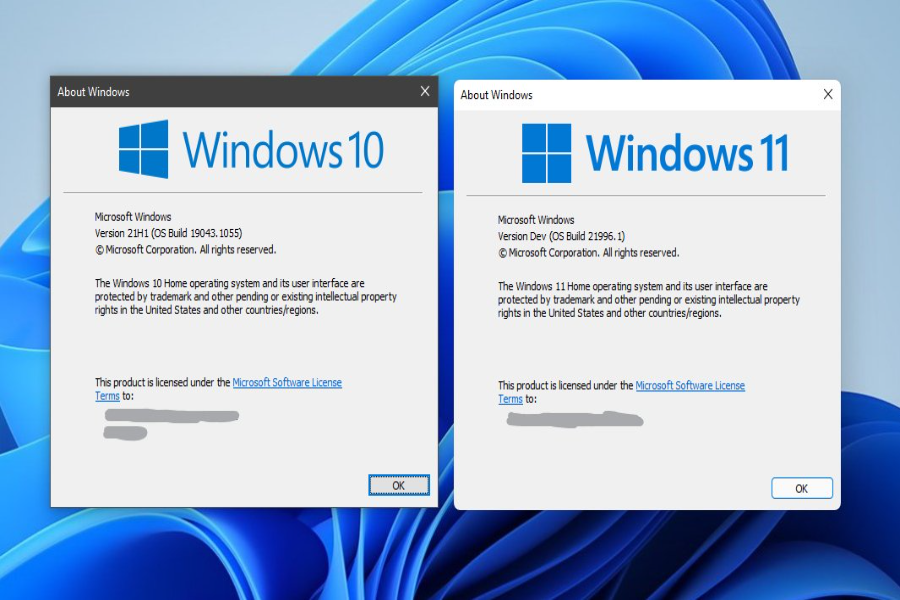
A simple Windows 10 Vs 11 comparison depends on your needs. Windows 10 is familiar and can run well on many older computers. That’s fine for users who need basic browsing, office work and older software. But the end of support makes it dangerous on internet-connected devices. Take security seriously after support ends.
Windows 11 is a better choice for those getting a new PC or have modern hardware. It brings better long-term support, a cleaner design, updated features and a stronger security direction. If your computer supports Windows 11 well, then it is the more secure choice. If your PC is old and unsupported, you may need to get a new device, buy an extended security option or another operating system plan.
Windows 10 Vs 11 Gaming
Windows 10 Vs 11 gaming is an important topic for players. Many games still run well on Windows 10. Windows 10 also sometimes feels smoother on older hardware as it has less new requirements . If your system is stable and you are mainly offline gaming , you might not see a big difference immediately .
Windows 11 has gaming features that make it stronger for newer PCs. Microsoft highlights Auto HDR, which can upgrade supported DirectX 11 and DirectX 12 games from SDR to HDR on compatible displays. Windows 11 also supports modern gaming features like DirectStorage when the game and hardware support it. For new gaming PCs, Windows 11 is usually the smarter path.
Which One Should You Choose
Windows 10 Vs 11 choice should start with your device. If your computer supports Windows 11 officially, upgrading makes sense for safety and future updates. You get a newer design, better support, and a system built for current hardware. This is especially true if you use your PC online every day.
If your PC does not support Windows 11, do not rush without thinking. Check your processor, TPM, Secure Boot, RAM and storage Microsoft has been very clear about the specifications for Windows 11 on its specifications page. Upgrading a PC that’s too old may lead to driver or performance issues. In that case, a supported new PC may be a better long-term choice.
Common Problems After Upgrading
Some users face small issues after moving from Windows 10 Vs 11. The Start menu feels different. Right-click menus may need extra clicks. Some older apps may behave strangely. A few users also report driver problems after upgrading. These are not always serious problems but they can be annoying for the first few days.
The best way to avoid trouble is to do your homework before you upgrade. Back up your files. Update important apps. Check printer, audio, graphics, and Wi-Fi drivers. Also make sure your PC has enough free storage. A clean and prepared upgrade usually feels better than a rushed one. If you use your computer for work, test important software first.
Read More: Livingston Community Health, 12 Crucial Location Updates To Avoid Confusion
Final Thoughts
Windows 10 Vs 11 is now easier to answer than before because Windows 10 support has ended. Windows 10 might feel cozy, but it’s not the best idea to run it online without regular security patches. It might still run, but it’s no longer the best option for most users who care about security and future support.
A better choice for modern, supported PCs is Windows 11. It has newer security, updated design, and a better long-term direction. Gamers with new hardware might find some value in Windows 11 features too. But your PC must meet the requirements. The smart move is simple. Check compatibility, back up your data, then choose the system that keeps your device safe and useful.
FAQs About Windows 10 Vs 11
Q1. Is Windows 11 Better Than Windows 10?
Yes on most supported PC’s Windows 11 is better for the future as Windows 10 is ending support.
Q2. How can I keep using Windows 10?
You can keep using it, but it’s more risky on the internet without regular security updates from Microsoft.
Q3. What Is The Biggest Windows 10 Vs 11 Difference?
The biggest difference is support and security. Windows 11 is current while Windows 10 has reached end of support.
Q4. Is Windows 11 Good For Gaming?
It’s good for newer gaming PCs. Supported games on compatible displays can take advantage of Auto HDR.
Q5. Will My Old Apps Work On Windows 11?
Many apps will work fine. But before you upgrade, check older business software or special tools.
Q6. Is it time to upgrade to Windows 11?
If your PC can handle it, it makes sense to upgrade. Back up your files before starting.
Q7. Which Is Faster Windows 10 Or Windows 11?
It depends on your hardware. Windows 11 might feel more at home on newer PCs, Windows 10 might feel lighter on old machines.